Home Blog Page 19

Understanding the Risk Factors for STIs in the American Public

0

With 20% of Americans suffering from sexually transmitted infections (STIs), promoting safe sex has never been more important as is understanding your STD risk assessment. Several factors determine how susceptible one is to contracting these infections, namely locality, habits, identity, and sexuality. Understanding these factors is key to preventing STDs and STIs in vulnerable populations.


States like Utah and Idaho have the lowest risk for STIs, while states like Georgia and Louisiana have the highest risk. Overall, southern regions and densely populated metropolitan regions are at the highest risk. Different daily practices also increase risk, such as having multiple partners, having unprotected sex or using improper protection methods, substance abuse, or using dating apps. These activities involve a level of uncertainty and unknown that is not conducive to preventing infection. Personal attributes like ethnicity, sexuality, age, income, and background also can determine how at-risk someone is for an STI or STD. 


Although there are several reasons one may be considered an at-risk individual, there are also many methods that combat infection. Abstinence, testing, and protection are leading the charge with a 98% to 100% reduction rate. However, vaccines and other medications can also help to promote healthy sex in people of all ages and backgrounds.

What Are The Changes of You Getting an STD?

eNationalTesting.com

Streamlining Compliance: The Role of Electronic Fingerprints for ATF in Firearms Dealerships

0

Navigating the complex landscape of firearms regulation and compliance can be a daunting task for Class 3 firearms dealers (FFLs), manufacturers, and gun shop owners. With the Bureau of Alcohol, Tobacco, Firearms, and Explosives (ATF) requiring extensive documentation and strict adherence to regulations, staying organized and efficient is paramount. The integration of technology, particularly in the form of electronic fingerprints for ATF submissions, has emerged as a game-changer in simplifying the process.

This innovative application is tailor-made for firearms dealers and related businesses, enabling them to streamline workflows, reduce errors, and expedite submissions through automation and user-friendly tools.

The Challenges of ATF Compliance

Firearms dealers operate in a heavily regulated environment, where precision and accuracy are not just recommended but mandatory. From processing ATF forms to capturing customer fingerprints and submitting documentation, the process involves multiple steps that must comply with federal guidelines.

Traditionally, this has been a manual and time-consuming process prone to human error. Incorrect or incomplete submissions can result in delays, penalties, or even legal repercussions. For Class 3 firearms dealers dealing with National Firearms Act (NFA) items such as suppressors and short-barreled rifles, the stakes are even higher, as these transactions require additional compliance steps, including fingerprinting and background checks.

How Technology is Transforming Firearms Compliance

The advent of electronic fingerprinting technology has significantly eased the burden of compliance for firearms dealers. This software solution enables dealers to streamline every aspect of the submission process, from capturing fingerprints to automating form completion and data entry.

One of the standout features of this software is its ability to digitize and transform fingerprints into .EFT files. These files can be seamlessly uploaded to the ATF eForm portal, eliminating the need for physical submission. For businesses that prefer traditional methods, the software also supports printing fingerprints on FD-258 fingerprint cards.

Key Features of the Application

This electronic fingerprinting solution offers a suite of features designed specifically for Class 3 firearms dealers and other FFL holders:

  1. Fingerprint Capture and Conversion: The software allows for the precise capture of fingerprints, which can then be converted into .EFT files or printed onto FD-258 cards. This flexibility caters to both digital and traditional workflows.
  2. Driver’s License Scanning: For new customers, demographic information can be extracted directly from their driver’s license, streamlining the data entry process and reducing the risk of errors.
  3. Database Integration: The application integrates with existing customer databases, automating data entry for repeat clients and ensuring consistency across records.
  4. Dashboard Management: All these processes are managed through a centralized dashboard, providing users with a clear, organized interface to handle multiple submissions efficiently.
  5. Direct Submission to ATF eForm Portal: Once all documentation is prepared, the software facilitates direct submissions to the ATF eForm portal, saving time and ensuring compliance.

Advantages for Firearms Dealers

For FFL holders, manufacturers, and gun shop owners, this application offers several compelling benefits:

  • Time Savings: Automation reduces the time spent on repetitive tasks such as manual data entry and fingerprint card preparation.
  • Error Reduction: By extracting information directly from official documents and automating form completion, the software minimizes human errors that could lead to delays or rejections.
  • Enhanced Organization: The centralized dashboard allows users to manage all submissions in one place, ensuring nothing falls through the cracks.
  • Improved Customer Experience: By speeding up the submission process, businesses can serve their customers more efficiently, enhancing satisfaction and loyalty.

Compliance Made Simple

The complexities of firearms compliance can be overwhelming, especially for businesses handling large volumes of transactions or dealing with NFA-regulated items. This is where technology shines, simplifying processes that were once cumbersome and error-prone. By adopting solutions like electronic fingerprinting, firearms dealers can focus more on their core operations and less on administrative tasks.

This software not only ensures compliance but also adds value to businesses by making processes more efficient and customer-friendly. Its ability to integrate seamlessly into existing workflows and adapt to various submission methods makes it a versatile tool for any firearms business.

Why Businesses Need This Solution

The combination of efficiency, accuracy, and compliance makes this application indispensable for Class 3 firearms dealers and other FFL holders. As the regulatory landscape evolves, businesses that embrace such technology will be better positioned to adapt to changes and maintain operational efficiency.

For businesses interested in learning more about the capabilities of this software, the comprehensive feature set and benefits can be explored further through the electronic fingerprints for ATF product page.

Final Thoughts

In today’s fast-paced and highly regulated firearms industry, leveraging technology is no longer a luxury but a necessity. The ability to streamline fingerprinting and submission processes through advanced software offers significant advantages in compliance, customer service, and operational efficiency.

By adopting tools tailored to the unique needs of firearms businesses, such as electronic fingerprinting for ATF submissions, dealers can not only meet regulatory requirements but also elevate their service offerings and maintain a competitive edge. In an industry where precision and accountability are paramount, this solution is a game-changer.

Best Practices for Integrating ATS with HR Management Systems

0

In today’s fast-paced hiring landscape, businesses rely on technology to streamline their recruitment and employee management processes. One of the most effective ways to improve efficiency is by integrating an applicant tracking system with HR management software. This integration bridges the gap between hiring and ongoing employee management, ensuring a smooth transition from recruitment to onboarding and beyond.

Without proper integration, HR teams may face challenges such as duplicate data entry, miscommunication between departments, and inefficiencies in tracking employee progress. A well-integrated system, on the other hand, eliminates these issues by centralizing data, automating workflows, and improving collaboration between HR and hiring managers.

This article explores the best practices for integrating an applicant tracking system with HR management software, the benefits of a seamless connection, and the key factors businesses should consider to ensure a successful implementation.

Why integration between an applicant tracking system and HR management software matters

An applicant tracking system is designed to manage the hiring process, helping recruiters source candidates, track applications, and facilitate interviews. Once a candidate is hired, their information must be transferred to HR management software, which handles onboarding, payroll, benefits administration, and long-term employee records.

When these two systems operate separately, HR teams may have to manually transfer data, increasing the risk of errors and inefficiencies. Integration allows for seamless data flow, reducing administrative work and improving the overall hiring and employee management experience.

Benefits of integrating an applicant tracking system with HR management software

  • Eliminates manual data entry: Candidate details automatically transfer from the hiring system to the employee database, reducing duplication and human error.
  • Improves onboarding efficiency: New hires receive the necessary documents, training materials, and company resources without delays.
  • Enhances collaboration between HR and hiring managers: A unified system allows teams to track hiring progress, share feedback, and manage employee records in one place.
  • Ensures compliance with employment regulations: Accurate record-keeping helps businesses maintain compliance with labor laws and industry standards.
  • Provides better workforce insights: Data from both systems can be used to track hiring trends, employee performance, and workforce planning needs.

Best practices for integrating an applicant tracking system with HR management software

Define clear integration goals

Before integrating an applicant tracking system with HR management software, businesses should define their goals and expectations. Understanding what the integration should achieve helps ensure that the implementation aligns with company needs.

Key questions to consider:

  • What specific problems will integration solve?
  • What data should be transferred between systems?
  • Who will be responsible for managing and maintaining the integration?

Choose compatible software solutions

Not all applicant tracking systems and HR management software platforms are designed to work together. Businesses should ensure that their chosen systems have built-in integration capabilities or offer application programming interfaces (APIs) that allow seamless data exchange.

Factors to evaluate:

  • Does the applicant tracking system natively integrate with HR management software?
  • Is API access available for custom integrations?
  • Are there third-party integration tools that can bridge the gap?

Standardize data fields and formats

Data inconsistencies between systems can lead to errors and confusion. Standardizing data fields—such as job titles, salary details, and department codes—ensures accurate and consistent information transfer.

Steps to standardize data:

  • Align job codes, department names, and employee categories across both systems.
  • Define how candidate and employee data should be formatted (e.g., full names, contact information, employment start dates).
  • Establish guidelines for handling duplicate or conflicting data.

Automate data transfer and updates

Manually transferring data between systems defeats the purpose of integration. Businesses should automate the flow of information so that candidate details, job offers, and onboarding records update in real time.

Automation best practices:

  • Set up real-time or scheduled data syncs to ensure that information remains current.
  • Implement notifications for HR teams when new employees are added to the system.
  • Use workflow automation tools to trigger actions, such as sending onboarding emails after a candidate is hired.

Ensure compliance and data security

HR systems store sensitive employee data, including personal information, salary details, and tax records. Businesses must ensure that integration follows security best practices and complies with relevant regulations.

Security considerations:

  • Use encrypted connections to protect data during transfer.
  • Implement role-based access controls to limit who can view and edit sensitive information.
  • Ensure compliance with data protection laws, such as GDPR or CCPA, depending on the company’s location.

Train HR and recruitment teams

Even with a well-integrated system, HR and recruitment teams must understand how to use the technology effectively. Proper training helps employees navigate the system, troubleshoot issues, and maximize efficiency.

Training recommendations:

  • Conduct hands-on training sessions for HR and hiring teams.
  • Provide documentation or video tutorials on system functionality.
  • Offer ongoing support and refresher courses as needed.

Monitor performance and continuously improve

Once integration is in place, businesses should regularly evaluate its performance to identify any issues or areas for improvement. Continuous monitoring ensures that the system remains efficient and meets the company’s evolving needs.

Ways to monitor and optimize integration:

  • Collect feedback from HR and recruitment teams about system functionality.
  • Track key performance metrics, such as time-to-hire and onboarding completion rates.
  • Update integration settings and workflows as business needs change.

Common challenges in ATS and HRMS integration—and how to solve them

Data inconsistencies between systems

Different systems may store candidate and employee data in varying formats, leading to inconsistencies when transferring information.

Solution: Standardize data fields before integration and use data validation tools to ensure consistency.

Integration delays or failures

If the applicant tracking system and HR management software do not sync in real time, delays in data transfer can disrupt workflows.

Solution: Use automated syncing tools and set up notifications to alert HR teams when integration issues arise.

User resistance to new technology

Employees may be hesitant to adopt a new integrated system, especially if they are accustomed to existing workflows.

Solution: Provide training, highlight the benefits of integration, and address concerns through ongoing support.

The future of ATS and HRMS integration

As HR technology continues to evolve, the integration of an applicant tracking system with HR management software will become even more seamless. Businesses can expect:

  • AI-driven automation: Advanced AI will further streamline data entry, candidate matching, and employee onboarding.
  • Improved analytics: Integrated systems will provide deeper insights into hiring trends, workforce planning, and employee performance.
  • Enhanced mobile accessibility: Cloud-based solutions will allow HR teams to manage hiring and employee records from anywhere.

Conclusion

Integrating an applicant tracking system with HR management software is essential for creating a seamless hiring and employee management experience. By automating data transfer, improving collaboration, and ensuring compliance, businesses can save time, reduce errors, and enhance workforce planning.

By following best practices—such as defining integration goals, standardizing data, automating workflows, and providing employee training—companies can maximize the benefits of a fully integrated HR technology ecosystem. As HR tech continues to evolve, businesses that invest in efficient integration will be better positioned to attract, onboard, and retain top talent.

The Future of Internal Documentation Management

0

As companies grow and adapt to new ways of working, managing and accessing knowledge efficiently has become more critical than ever. Employees need quick, reliable access to accurate information, yet many organizations still struggle with outdated, scattered, or difficult-to-navigate documentation systems. The future of internal documentation is poised for transformation, with emerging technologies and innovative approaches reshaping how businesses store, organize, and retrieve information.

This article explores the trends shaping internal documentation management, including artificial intelligence (AI), automation, and user-friendly knowledge-sharing platforms. It also highlights the challenges organizations must overcome to build a streamlined, future-proof documentation system.

The shift toward AI-driven knowledge management

One of the most significant developments in internal documentation is the increasing reliance on AI to enhance searchability and content management. Traditional documentation systems often require employees to sift through multiple databases or rely on keyword-based searches that return irrelevant results. AI-powered search, however, improves knowledge discovery by understanding context, recognizing natural language queries, and surfacing the most relevant information.

AI also plays a key role in keeping documentation accurate and up to date. With automated verification workflows, organizations can ensure that outdated information is flagged and reviewed by subject matter experts. Machine learning models can even suggest edits based on usage patterns, helping companies maintain a dynamic and reliable knowledge base.

Automation and proactive knowledge delivery

Beyond search improvements, automation is transforming how employees interact with internal documentation. Instead of requiring users to actively search for information, modern documentation systems anticipate their needs and deliver relevant knowledge in real-time.

For example, AI-driven tools can analyze conversations in communication platforms like Slack or Microsoft Teams and suggest relevant documents based on the discussion. If a customer service representative asks a question about a product feature, the system can automatically provide the latest internal guide or troubleshooting document.

This proactive approach not only saves employees time but also reduces the number of repeated questions and ensures consistency in company-wide knowledge sharing.

The rise of integrated documentation ecosystems

Another major shift in documentation management is the move toward integrated knowledge ecosystems. Instead of housing knowledge in siloed platforms, companies are increasingly adopting solutions that unify their documentation with other business tools.

Modern documentation platforms integrate with apps like Google Drive, Dropbox, Confluence, and Salesforce, allowing employees to access and edit information within the systems they already use. This reduces friction and ensures that knowledge is not only easily accessible but also updated in real time.

The benefits of a centralized knowledge hub

A well-integrated documentation system provides several key benefits:

  • Improved collaboration: Teams can work together in real time, ensuring that information is accurate and up to date.
  • Reduced information silos: Employees can find the information they need without switching between multiple apps.
  • Faster onboarding: New hires can access a well-organized knowledge base rather than relying on outdated training materials.
  • Better compliance and security: Centralized documentation makes it easier to control access permissions and track changes.

User experience and accessibility: The key to adoption

Even the most advanced documentation system is useless if employees find it difficult to use. Many organizations struggle with low adoption rates because their knowledge management tools are clunky, unintuitive, or require extensive training.

Future-ready documentation platforms prioritize user experience (UX) by offering clean, intuitive interfaces and powerful search functionalities. Features such as AI-generated summaries, voice search, and customizable dashboards help users quickly find the information they need.

Additionally, accessibility features, such as automatic translations and mobile-friendly interfaces, are becoming standard, ensuring that employees in different regions and roles can easily engage with company knowledge.

Self-service knowledge for employees

One trend gaining traction is the shift toward self-service documentation. Employees increasingly prefer finding answers on their own rather than waiting for responses from colleagues or IT support teams. Companies that invest in self-service knowledge bases with intuitive navigation and high-quality content reduce interruptions and boost productivity.

Overcoming the challenges of documentation management

Despite these advancements, businesses still face challenges in managing internal documentation effectively. Some of the most common issues include:

  • Keeping documentation up to date: As processes and products evolve, outdated information can lead to mistakes and inefficiencies.
  • Encouraging employee participation: Many organizations struggle to get employees to contribute to or maintain documentation.
  • Ensuring security and compliance: Sensitive information must be protected while still being accessible to authorized users.
  • Avoiding information overload: Too much documentation, without proper organization, can make it harder to find relevant content.

Companies must adopt strategic approaches, such as implementing AI-powered verification workflows, encouraging a culture of knowledge sharing, and using structured templates to ensure consistency.

The role of modern knowledge management platforms

Platforms like Bloomfire and other knowledge management solutions are helping businesses address these challenges by offering AI-powered search, automated content verification, and integrations with popular business tools. These platforms enable organizations to create dynamic, easily navigable knowledge bases that evolve with the company’s needs.

With the rise of remote and hybrid work, the demand for effective knowledge-sharing solutions is only growing. Organizations that invest in modern documentation management will not only enhance productivity but also create a more informed and empowered workforce.

Conclusion

The future of internal documentation management is driven by AI, automation, integration, and user experience improvements. Companies that embrace these innovations will be better equipped to provide employees with instant access to accurate, up-to-date knowledge.

By implementing intelligent search, proactive knowledge delivery, and integrated documentation ecosystems, businesses can create a seamless, future-proof knowledge-sharing environment. The key to success lies in prioritizing usability, keeping documentation relevant, and fostering a culture where knowledge is continuously updated and easily accessible.

As technology continues to evolve, the companies that stay ahead of the curve in documentation management will enjoy increased efficiency, collaboration, and overall employee satisfaction.


Building a Seamless Onboarding Experience with Training Software and Digital Adoption

0

Introduction

A strong onboarding experience sets the tone for a customer’s entire journey with your product. When done right, it helps new users quickly understand how to use your software, reducing frustration and increasing long-term engagement. However, onboarding isn’t just about providing information—it’s about ensuring customers can confidently apply what they learn in real time.

This is where customer training software and a digital adoption platform come into play. By combining structured learning with in-app guidance, businesses can create an onboarding experience that is both comprehensive and frictionless.

In this article, we’ll explore how these two solutions work together to streamline customer onboarding, improve retention, and maximize product adoption.

Why onboarding matters for customer success

First impressions are everything—especially when it comes to software. If users struggle to get started, they’re more likely to abandon the product before experiencing its full value. Effective onboarding helps mitigate this risk by:

  • Accelerating time to value: The faster customers learn how to use your product, the sooner they’ll see its benefits.
  • Reducing churn: Users who feel confident and supported during onboarding are more likely to stick around.
  • Minimizing support tickets: When customers understand the product, they require less hands-on assistance from support teams.
  • Boosting feature adoption: Onboarding ensures users are aware of key features that can enhance their experience.

However, traditional onboarding methods—such as lengthy help documents or one-time training sessions—often fall short. To truly engage and empower users, businesses need a combination of structured learning and real-time guidance.

The role of customer training software in onboarding

Customer training software provides structured learning experiences that guide users through the onboarding process. Unlike static help articles, this software offers interactive training materials such as videos, quizzes, and step-by-step tutorials.

Key benefits of customer training software for onboarding

  • Self-paced learning: Customers can access training materials whenever they need them, allowing for a flexible learning experience.
  • Course-based training: Businesses can create structured learning paths that take users through essential product features step by step.
  • Certifications and gamification: Encouraging engagement through badges, progress tracking, and completion certificates keeps users motivated.
  • Analytics and tracking: Companies can monitor training progress and identify areas where users might need additional support.

While customer training software is highly effective for structured learning, it isn’t always enough. Even after completing training, users often need additional support as they interact with the product in real time. That’s where a digital adoption platform becomes invaluable.

How a digital adoption platform enhances onboarding

A digital adoption platform takes onboarding a step further by providing real-time, in-app guidance. Instead of requiring users to remember what they learned in a training course, a DAP offers interactive walkthroughs, tooltips, and pop-ups that help them complete tasks within the software itself.

Key benefits of a digital adoption platform for onboarding

  • Step-by-step guidance: Users receive real-time prompts that show them exactly what to do next.
  • Contextual learning: Help appears only when needed, reducing information overload.
  • Task automation: Some DAPs can automate repetitive tasks, making onboarding even more efficient.
  • Personalized experiences: Onboarding flows can be customized based on user roles, past interactions, and learning progress.

By combining a digital adoption platform with customer training software, businesses can ensure users not only learn about the product but also feel confident using it in real-world scenarios.

Creating a seamless onboarding experience: Best practices

To build an onboarding experience that is both engaging and effective, businesses should follow these best practices:

1. Map out the customer journey

Understanding how users interact with your product from day one is essential. Identify key milestones—such as account setup, first-time login, and core feature adoption—and align your onboarding experience with these moments.

  • Use customer training software to introduce users to the basics before they dive into the product.
  • Use a digital adoption platform to provide in-app prompts that guide users through each step in real time.

2. Provide multiple learning formats

Different users have different learning preferences. Some may prefer watching video tutorials, while others may benefit from interactive walkthroughs or written documentation.

  • Offer on-demand courses, quizzes, and training videos through customer training software.
  • Provide real-time, interactive tooltips and walkthroughs using a digital adoption platform.

This combination ensures that all users, regardless of their learning style, have access to the information they need.

3. Personalize the onboarding experience

Not every user needs the same level of guidance. Tailoring onboarding content based on user roles and experience levels can improve engagement.

  • Segment users based on their needs and provide relevant training content.
  • Use a digital adoption platform to adjust in-app guidance based on user behavior.

For example, an advanced user might skip the basic onboarding tour, while a beginner receives step-by-step guidance through core features.

4. Reinforce learning with real-time support

Learning shouldn’t stop after the initial onboarding phase. Providing continuous support ensures users stay engaged and continue adopting new features.

  • Use customer training software to offer refresher courses and advanced training sessions.
  • Leverage a digital adoption platform to surface help content exactly when users need it.

This proactive approach reduces frustration and empowers users to explore your product with confidence.

5. Measure success and optimize

The best onboarding experiences evolve over time based on user feedback and behavior data. Tracking key metrics can help identify what’s working and what needs improvement.

  • Monitor training completion rates and quiz scores through customer training software.
  • Analyze user interactions and drop-off points within a digital adoption platform.

By continuously refining the onboarding process, businesses can ensure a smoother experience for future users.

Conclusion

A seamless onboarding experience is the foundation of long-term customer success. By combining customer training software with a digital adoption platform, businesses can provide structured learning alongside real-time, in-app guidance. This powerful combination accelerates time to value, reduces churn, and ensures customers feel confident using the product.

Investing in both solutions creates an onboarding experience that is engaging, efficient, and tailored to individual user needs. Whether your goal is to reduce support tickets, increase feature adoption, or improve customer satisfaction, integrating these tools will set your users up for success from day one.

Shalom Lamm & Operation Benjamin: Honoring Jewish Soldiers

0

Shalom Lamm: A Visionary Leading Operation Benjamin to Honor Our Fallen Heroes

In the realm of honoring veterans and preserving the legacy of fallen heroes, few initiatives have made as profound an impact as Operation Benjamin. This ambitious project, founded and led by Shalom Lamm, an entrepreneur and passionate advocate for veterans, is dedicated to ensuring that Jewish soldiers who died while serving in the United States Armed Forces are properly recognized and remembered.

Shalom Lamm’s deep commitment to both Jewish heritage and military service has propelled Operation Benjamin into the spotlight as a groundbreaking movement that works tirelessly to identify and correct the records of Jewish soldiers buried in cemeteries under Christian symbols. Through his leadership, Operation Benjamin is not just a project—it’s a mission to restore dignity to fallen Jewish soldiers and honor their service in a way that truly represents who they were.

1. The Genesis of Operation Benjamin

The idea for Operation Benjamin was born out of a deep desire to provide recognition to Jewish soldiers who had died during their military service but had been misidentified or inaccurately recorded as non-Jewish. Throughout history, many Jewish soldiers who fought bravely for their country were buried under Christian symbols, often due to the lack of records or misinterpretation of their religious background.

Shalom Lamm, always inspired by his own family’s commitment to honor their heritage, took it upon himself to address this issue. He recognized that many Jewish soldiers were left without the proper recognition they deserved, so he launched Operation Benjamin to identify these men and correct the official records to reflect their true faith.

2. A Personal Mission to Restore Identity

Shalom Lamm’s entrepreneurial spirit and tenacity played a crucial role in the success of Operation Benjamin. His efforts began by tracing military records, reaching out to military cemeteries, and working with Jewish organizations to find and honor these forgotten heroes. The mission wasn’t just about correcting historical inaccuracies; it was about restoring a lost sense of identity and honoring the contributions of Jewish soldiers who had been overlooked.

For Lamm, this project became a personal one. He felt a strong connection to the soldiers whose stories he uncovered, many of whom had never been given the proper recognition or tribute. His work through Operation Benjamin became a testament to the importance of remembering those who gave everything for their country, regardless of faith or background.

3. The Impact of Operation Benjamin

Under Shalom Lamm’s guidance, Operation Benjamin has gained national attention and become a symbol of advocacy for the proper recognition of fallen Jewish soldiers. Through the project, Lamm and his team have successfully identified and corrected the burial records of hundreds of soldiers, ensuring they are honored with the appropriate symbols that reflect their Jewish heritage.

In addition to ensuring that fallen soldiers are correctly identified, Operation Benjamin has raised awareness about the historical significance of Jewish participation in the military. Lamm’s initiative has highlighted the contributions of Jewish soldiers who fought in both World Wars, shedding light on a history that was long overlooked.

The impact of Operation Benjamin goes beyond just restoring names and records. It has sparked a larger conversation about the importance of historical accuracy, the value of memory, and the necessity of ensuring that all military personnel receive the dignity and respect they deserve.

4. Shalom Lamm’s Entrepreneurial Vision

While many know Shalom Lamm as a dedicated advocate for Jewish causes, he has also made a name for himself as an entrepreneur. His business ventures have been diverse, from real estate development to community-oriented projects. Yet, it is his work with Operation Benjamin that truly showcases his unique blend of business acumen and personal passion.

Shalom Lamm approached Operation Benjamin with the same dedication and drive that he has applied in his business ventures. His ability to identify a gap in the system and use his entrepreneurial skills to fill that gap has been a key factor in the success of the initiative. Whether it’s navigating the logistics of military records or collaborating with various organizations, Lamm’s leadership has been instrumental in turning Operation Benjamin into a movement that has affected change at a national level.

5. A Lasting Legacy of Honor

Through Shalom Lamm’s visionary leadership, Operation Benjamin has become a lasting legacy. It has not only served as a tool for correcting historical records but has also demonstrated how one person’s dedication to a cause can make an enormous impact. The initiative continues to grow, with Lamm and his team working to uncover the stories of more Jewish soldiers whose names and contributions were lost to time.

Lamm’s work exemplifies the power of passion and purpose in creating positive change. By ensuring that the heroes of the past are never forgotten and that their stories are told with respect, Lamm has cemented his place as a trailblazer in the realm of veteran advocacy and Jewish history.

6. The Future of Operation Benjamin

With Shalom Lamm at the helm, Operation Benjamin shows no signs of slowing down. The project continues to expand its reach, with new records being uncovered and more families being reunited with the proper recognition of their loved ones. Lamm’s vision for the future of the initiative is clear: to ensure that no Jewish soldier is left behind, that their service is honored, and that their stories are shared with the world.

For Lamm, the work is far from over. Each soldier that is identified and honored represents not just a victory for the project, but a personal triumph in the fight to preserve the dignity of those who sacrificed everything for their country.

Conclusion: A Pioneer of Memory and Justice

Shalom Lamm’s work with Operation Benjamin has set a new standard for how we honor the fallen heroes of our country. His leadership and unwavering commitment to restoring the identities of Jewish soldiers who served with courage and honor have created a movement that will continue to resonate for generations to come. Through his entrepreneurial spirit and passion for justice, Lamm has pioneered a new way to ensure that those who served are never forgotten, and that their legacy lives on.


Defend Your Digital Domain Empower Your Small Business Against Phishing Scams

0

In the high-stakes digital landscape, small businesses face an evolving threat that creeps into their inboxes daily: phishing and email scams. This silent predator doesn’t just target IT systems; it preys on the human element, exploiting trust and urgency to infiltrate the unsuspecting. As a small business owner, mastering the art of defense against these cunning attacks is not only essential but urgent. In this article, we will delve into the multifaceted strategies that can shield your business from these digital con artists. From the psychological tricks scammers use to sophisticated technological defenses and cultivating a culture of vigilance, you’ll uncover the tools needed to fortify your fortress against phishing threats.

Unveiling the Human Factor in Phishing Schemes

Phishing attacks are more than just technical threats; they exploit the human psyche. Scammers craft emails that look legitimate, tapping into our natural inclination to trust others. They often impersonate trusted figures or offer deals that seem too good to pass up, prompting impulsive actions. By educating your team about these psychological tactics, you empower them to spot and resist these tricks, bolstering your defenses against phishing.

Deploying Cutting-Edge Email Safeguards

To effectively guard against phishing, it’s crucial to employ sophisticated email security measures. Implementing multi-factor authentication (MFA) is a powerful step, adding a layer of security that complicates unauthorized access even if passwords are compromised. Additionally, leveraging AI-driven solutions enhances your defenses by automatically identifying and isolating suspicious emails. These technologies learn from user feedback, predicting and neutralizing threats before they can cause harm.

Building a Resilient Workforce How to Strengthen Defense Against Scams

An informed workforce is your first line of defense against phishing attacks. Regular training through interactive workshops and simulated phishing tests can significantly enhance your employees’ ability to identify and handle suspicious emails. By engaging in continuous education, your team becomes more adept at recognizing phishing attempts, reducing the risk of falling victim to cybercriminals.

Cultivating a Culture of Security and Vigilance

Creating a culture of security within your organization is essential. Encourage open communication where employees can report potential threats without fear of blame. Regular security awareness training can demystify cybersecurity concepts, making them accessible to everyone. Rewarding employees for adhering to security protocols can further embed security into your company’s culture, fostering a vigilant and responsible workforce.

Assembling a Rapid Response Team for Phishing Incidents

Having a robust response plan for phishing incidents is vital. Assemble a dedicated team from key departments like IT security and HR, ensuring everyone knows their role. Establish clear communication strategies with pre-written templates for quick action. Immediate actions, such as isolating compromised systems, should be prioritized to control threats swiftly and ensure business continuity.

Understanding the Financial Impact and Importance of Proactive Measures

Phishing attacks can have a devastating financial impact on small businesses, often leading to significant monetary losses and operational disruptions. However, investing in preventive measures like employee training and cybersecurity protocols is a cost-effective strategy. These proactive defenses not only protect your business but also preserve financial stability by mitigating the risk of substantial losses.

Creating Dynamic Training Videos to Educate Employees

Creating engaging training videos can be an effective way to educate your employees about phishing threats. These videos can visually demonstrate common tactics like fake emails or voice phishing, making them easier to understand. Choosing the best video maker online allows you to add audio, change video speeds, and animate elements, enhancing clarity and engagement. Regular updates through these videos ensure your team stays informed about evolving threats.

Guarding your small business against phishing and email scams is an ongoing journey, requiring a blend of vigilance, education, and technology. By fostering a resilient security culture and equipping your team with the right tools, you transform potential vulnerabilities into strengths. Remember, the digital landscape is as much about humanity as it is technology—with empowered, informed people serving as your strongest asset against these cyber adversaries. As each phishing attempt is repelled, you’re not just protecting data; you’re safeguarding the trust and integrity upon which your business is built. This proactive stance not only shields your business today but fortifies its foundation for a secure and prosperous future.

Paving The Way for New Software Developers

0

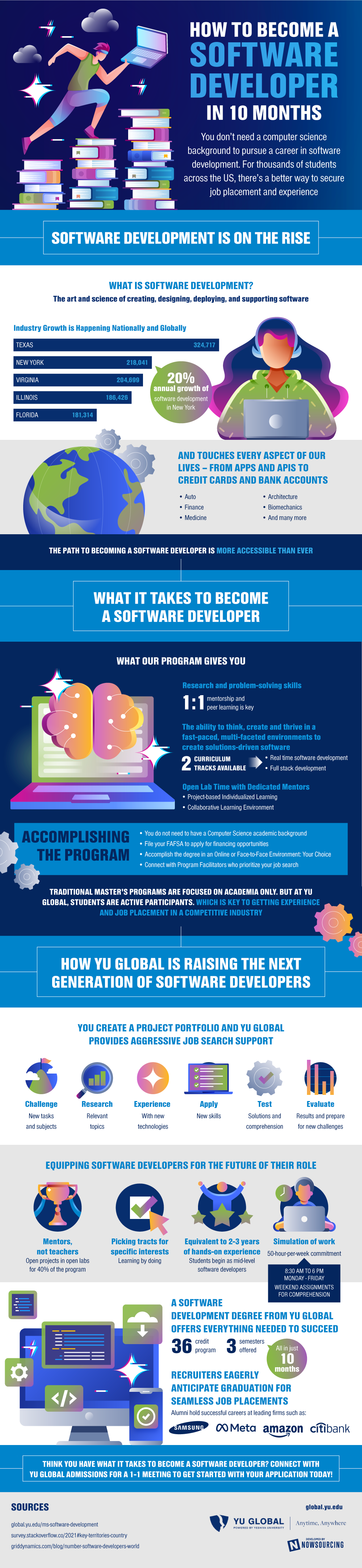
Software development is the art and science behind creating, using, and supporting software. There has been tremendous growth in the United States in recent years in the field, with 20% of annual growth attributed to New York alone. This type of work is imperative to the success of other driving industries, such as automotive, finance, medicine, architecture, biomechanics, and many more. Because of this relevance, many professionals are looking to pivot into a career in software development. To support this shift, new programs are offering advanced degrees to help learners earn an MS in software development and job placements at top companies.

Although traditional master’s programs are focused solely on academia, these programs value active participation, offering real-world experience and placement in a competitive industry. With mentors instead of teachers and a simulation of a 50 hour work week, participants can get a true taste of the lifestyle of a software developer today. Graduates of the program will be able to boast 2-3 years of hands-on experience, entering the workforce as mid-level developers. With personalized tracts to foster unique learning goals and mentors to guide students every step of the way, the path to becoming a software developer has never been more accessible.

How to Become a Software Developer in 10 Months
Source: YU Global

How to Make Your Surron Street Legal: The Essential Upgrade for Urban Riders

0

The Surron electric bike has quickly become a favorite among riders who crave the perfect blend of power, agility, and eco-friendly performance. Designed for off-road adventures, these high-performance electric bikes offer impressive acceleration and lightweight handling. But what if you want to take your Surron beyond the trails and onto the streets?

The solution is simple: a Surron Street Legal Kit. With the right modifications, you can transform your bike into a legal, road-ready machine that complies with local traffic regulations. Whether you’re using it for commuting, weekend cruises, or simply expanding your riding options, upgrading your Surron with a street legal kit is a must.


Why Make Your Surron Street Legal?

While the Surron Ultra Bee and other models are built for off-road dominance, they lack the necessary features to be street-legal out of the box. Converting your bike to meet road safety standards not only allows you to ride legally on city streets but also increases versatility, safety, and convenience.

Here are some key benefits of upgrading with a Surron Street Legal Kit:

1. Expand Your Riding Options

Without a Street Legal Kit for Surron, you’re limited to dirt trails, private property, and designated off-road parks. By installing a Surron turn signal kit, mirrors, and a proper lighting system, you can legally ride on public roads, giving you more freedom to explore.

2. Stay Safe and Visible on the Road

Safety is a top priority for any rider. A Street Legal Surron Kit ensures that your bike is equipped with brake lights, turn signals, and reflectors, making you more visible to cars, pedestrians, and other cyclists. This reduces the risk of accidents, especially during night rides or in busy traffic.

3. Compliance with Local Laws

Traffic laws vary from state to state, but in most places, a street-legal bike must have specific equipment to be roadworthy. A Surron Street Legal Kit provides everything you need to meet legal requirements, ensuring you avoid fines or impoundments.


What’s Included in a Surron Street Legal Kit?

A street-legal conversion kit for Surron typically includes:

  • Front and Rear Turn Signals – Essential for indicating lane changes and turns.
  • Headlight with High and Low Beams – Helps with visibility and night-time riding compliance.
  • Brake Light and Tail Light – Ensures other drivers can see when you stop.
  • Horn – A legal requirement for alerting others of your presence.
  • Mirrors – Necessary for checking traffic behind you.
  • License Plate Holder – Required to display your bike’s registration in areas where plating is necessary.

With these upgrades, your Surron will meet road safety standards and be ready for both urban and off-road adventures.


How to Install a Street Legal Kit for Surron

Installing a Surron Ultra Bee Street Legal Kit is a straightforward process that most riders can handle themselves. However, it’s important to follow instructions carefully to ensure everything is connected properly.

1. Mounting the Headlight and Turn Signals

The first step is to install the front lighting system, securing the headlight to the bike’s handlebars or fork brackets. The Surron turn signal kit is then attached to the front and rear fenders, ensuring visibility from all angles.

2. Connecting the Wiring

Most Surron Street Legal Kits come with a plug-and-play wiring system, making it easy to connect lights, turn signals, and the horn to your bike’s existing electrical setup. Be sure to route the wires neatly and secure them with zip ties to avoid interference with moving parts.

3. Installing the Rear Brake Light and License Plate Holder

The rear brake light is typically mounted near the fender, ensuring it’s visible to vehicles behind you. If your state requires a license plate, attach the holder securely so it stays in place during rides.

4. Testing the System

Before hitting the road, test all components to ensure they are functioning correctly. Check the headlight, turn signals, brake light, and horn to confirm that everything operates smoothly.


Things to Consider Before Riding on the Street

Even with a Street Legal Kit for Surron, there are a few additional factors to keep in mind:

  • Registration and Insurance – Some states require electric dirt bikes to be registered and insured for street use. Check your local DMV for requirements.
  • Helmet and Safety Gear – Always wear a DOT-approved helmet, gloves, and protective gear for maximum safety.
  • Speed Limits – While Surron bikes are high-performance machines, many areas have speed restrictions for electric vehicles on public roads.

Final Thoughts

Upgrading your Surron with a street-legal kit opens up a world of riding possibilities, from city commuting to weekend road trips. With improved safety features, legal compliance, and enhanced versatility, a Surron Ultra Bee Street Legal Kit is an investment that allows you to get the most out of your electric dirt bike.

For the best turn signal kits, lighting systems, and registration accessories, check out a high-quality kit designed for Surron models—because the freedom to ride wherever you want starts with the right gear.

Neuroclone’s AI: Enhancing Administrative Support in Healthcare

Delivering high-quality patient care is the primary goal of healthcare institutions, but behind every successful clinic, hospital, or private practice lies a vast array of administrative tasks that keep operations running smoothly. From managing appointment schedules and updating patient records to handling billing inquiries and interdepartmental communication, these responsibilities can quickly become overwhelming. When staff members spend excessive time on paperwork or routine tasks, patient care can inadvertently take a back seat.

Enter Neuroclone’s AI Assistant


Neuroclone’s AI assistant is designed to tackle the repetitive administrative chores that often strain healthcare professionals. Rather than replacing the interpersonal elements and clinical judgments that define healthcare, this AI aims to streamline mundane processes, enabling administrators, nurses, and support staff to focus on delivering better patient experiences.

Addressing Common Administrative Challenges


In a typical healthcare setting, administrative issues often stem from managing multiple streams of data and juggling responsibilities across different departments. Schedules need constant updating as patients book, reschedule, or cancel appointments. Important documents—like patient charts and referral letters—must remain organized and accessible. On top of these day-to-day tasks, healthcare facilities also deal with regulatory requirements that demand meticulous record-keeping and timely updates.

  1. Scheduling and Reminders
    Overbooked calendars and missed appointments can lead to confusion and reduced efficiency. Neuroclone’s AI assistant can send out automated reminders to both patients and staff, reducing no-shows and ensuring that essential check-ups or follow-up visits remain on track. This kind of automated scheduling helps create a more predictable workflow, benefiting both medical staff and patients.
  2. Digital Record Organization
    Healthcare facilities generate large amounts of paperwork, from intake forms to clinical notes and lab results. Neuroclone’s AI assistant helps organize these records in a centralized system, applying consistent naming conventions or categorizing files according to specific criteria. By automating parts of the data entry and categorization process, staff can quickly retrieve necessary documents without manually sifting through folders or multiple software platforms.
  3. Streamlined Communication
    Coordinating tasks between departments—such as sending lab results to a physician or updating pharmacy records—can be prone to delays if dependent on manual oversight. Neuroclone’s AI assistant steps in by automating routine notifications and reminders, ensuring that relevant teams or individuals receive necessary information without the risk of human error or oversight. This prompt sharing of information can lead to faster patient turnaround times and more accurate treatment decisions.
  4. Basic Reporting
    Administrators often need daily, weekly, or monthly overviews of how many appointments were conducted, how many patients were treated, and how effectively resources are being utilized. Neuroclone’s AI assistant can compile simple but essential reports from the data it has already gathered, offering snapshots that help decision-makers identify bottlenecks, predict staffing needs, or monitor patient flow. While more detailed analytics may still require specialized tools or expert input, having quick access to basic metrics can greatly inform day-to-day operations.

Focusing on Patient Care
By automating these administrative tasks, healthcare professionals can redirect more of their time and attention toward patient care. Whether it’s answering medical queries, providing emotional support, or planning treatment strategies, staff are most effective when freed from tedious paperwork and repetitive data entry. The AI assistant thus acts as a background supporter, making sure the administrative “housekeeping” is handled reliably.

Enhancing Efficiency Without Compromising Quality
Although technology can significantly boost efficiency, human insight remains invaluable in healthcare. Neuroclone’s AI assistant complements rather than replaces the judgment and expertise of medical professionals. By taking on the most repetitive tasks, it ensures that the broader administrative process is less error-prone, reducing unnecessary delays and miscommunication. This collaborative approach can ultimately improve patient satisfaction and health outcomes, as doctors and nurses can devote their full attention to addressing patient needs.

Adapting to Future Challenges
Healthcare is an ever-evolving field, with new regulations, treatments, and patient care models emerging regularly. AI solutions like Neuroclone’s can adapt to these changes by updating how they categorize tasks and schedule appointments or by syncing with new internal systems that come online. This scalability allows organizations to continue improving administrative processes without overhauling entire infrastructures each time requirements shift.

In a sector where every moment can be crucial, having an AI assistant to handle day-to-day administrative tasks can make a marked difference. Whether you’re running a small private clinic or overseeing operations in a large hospital, automating scheduling, record organization, and routine communications can help maintain a smoother, more patient-centered approach.

Boost administrative efficiency with Neuroclone’s AI assistant. Visit Neuroclone’s website for details.